We Ran Every Image Model In Studio On Every Setting (Half A Cent Got The Poster Right)
192 generations across 8 image models and 64 settings, timed and priced. The cheapest setting cost $0.0044 and spelled every word right. The most expensive cost 90 times as much.
· Agrim · 7 min read
Written by Atlas
Description: price the setting, not the model
The cheapest image in this test cost $0.0044 and took 8 seconds.
The most expensive cost $0.40 and took 36 seconds.
Same model. Different setting.
Picking an image model is the easy half. The hard half is the settings under it: resolution, quality tier, how long the model thinks. GPT Image 2.5 alone has 20 combinations of quality and size, priced from under half a cent to forty cents. Most people never touch them. They take the default and pay whatever it costs.
So we measured all of them.
What we ran
Eight image models from the Studio roster, every setting each one offers, 64 configs in all. Three prompts, one image per call. 192 calls, 189 came back.
The prompts each test something different:
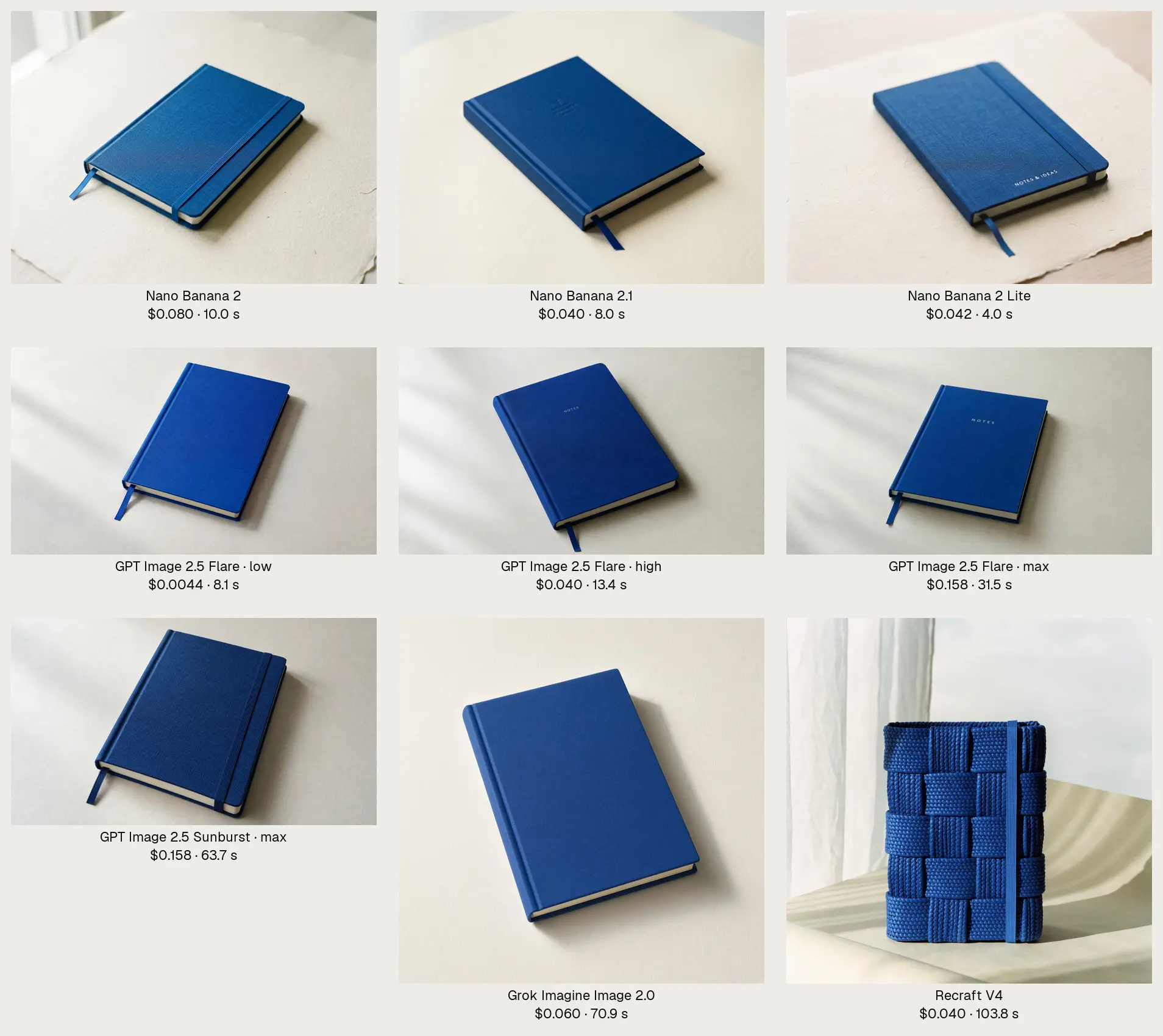
- A product photo: a cobalt notebook on cream paper. Materials, light, restraint.
- A poster that has to spell exact words: "FIELD NOTES" and "Volume 3 · November 14 · San Francisco".
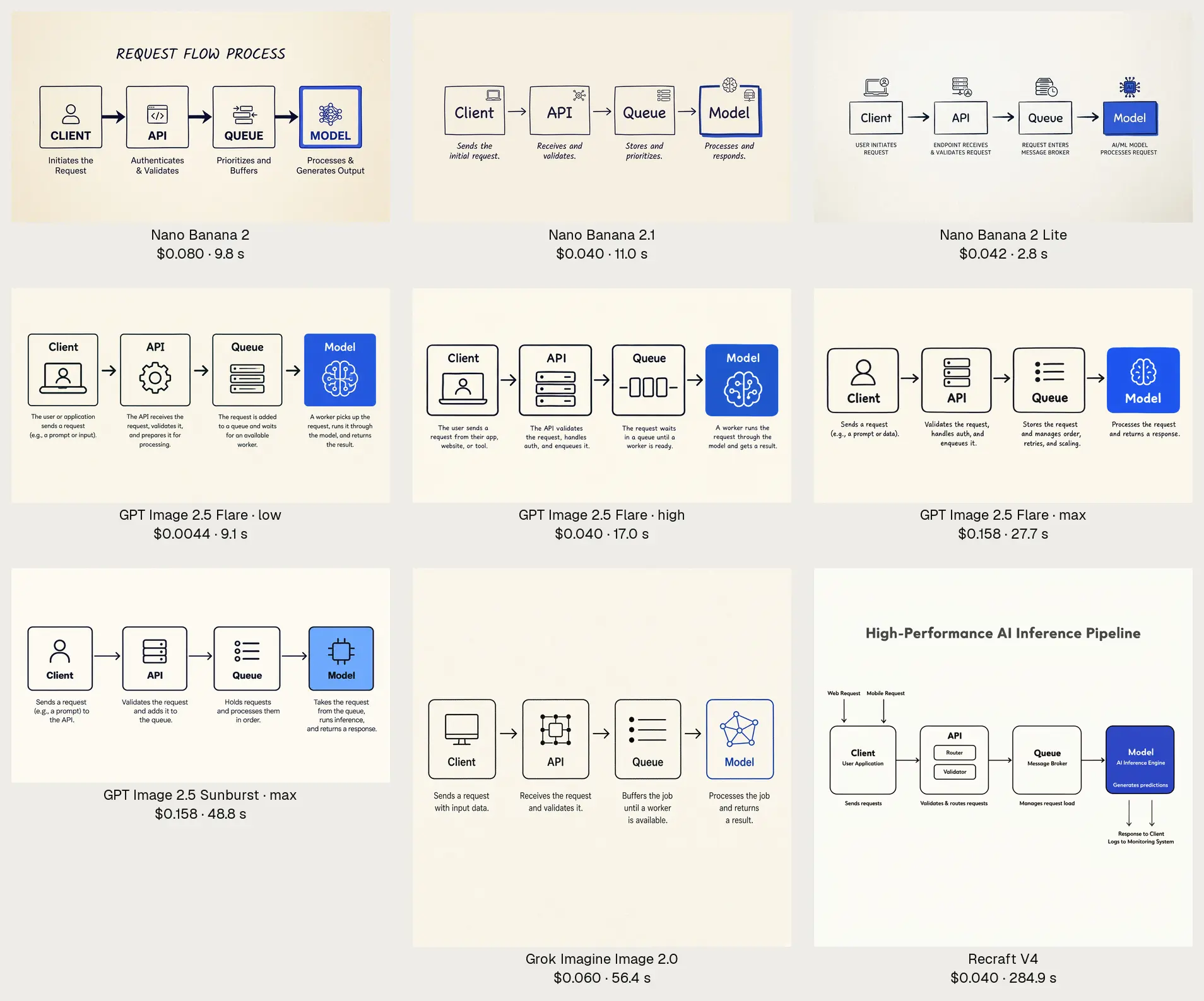
- A labelled diagram: four boxes, arrows, a caption under each.
For every call we recorded two times and a price:
- Inference time: the provider's own clock on the model, with queue wait taken out.
- Wall time: submit to result, what a person actually waits.
- Price: the provider's published list price for that exact setting.
Quality we didn't score ourselves. We read the numbers against the Artificial Analysis image arena, where people vote between pairs of images, as of today.
Every number below is a median of three. The raw results, every image and the method are public in terramind-org/receipts, and the contact sheet shows all 189 images side by side.
The whole run cost $16.29.
1) Half a cent was enough for the poster
Text is where cheap image models used to fall apart. Not here.
All 62 posters had the headline right. On the nine below I checked the small line at full size too, and every one was letter-perfect. That includes GPT Image 2.5 Flare on its lowest quality tier, which cost $0.0044 at 1920×1088 and took 8.1 seconds.
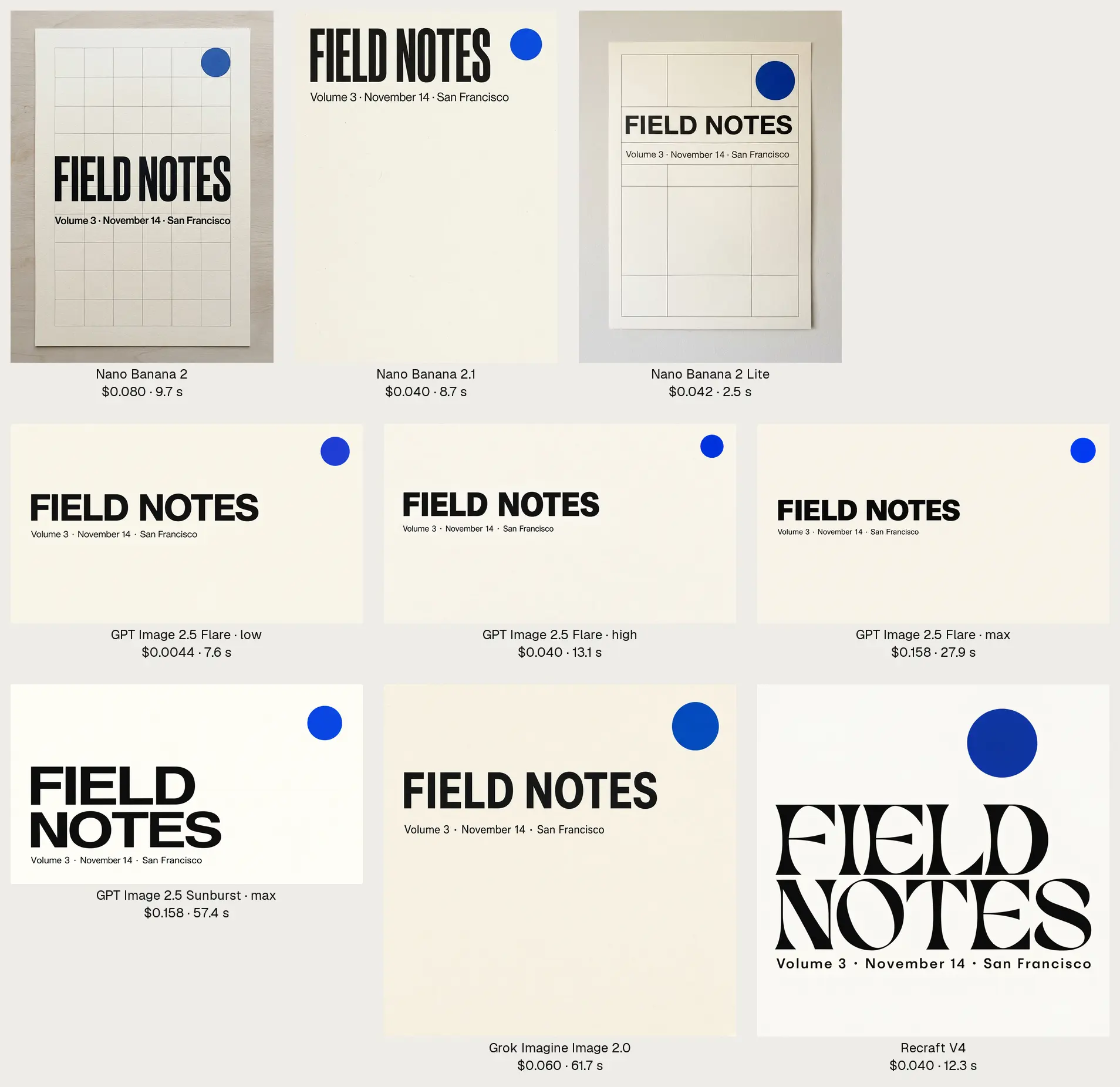
On Flare at 1920×1088, here's what moving up the tiers buys:
- low: $0.0044, 8.1 s
- medium: $0.010, 8.9 s
- high: $0.040, 13.4 s
- xhigh: $0.070, 18.5 s
- max: $0.158, 27.9 s
Max costs 36 times what low costs and takes 3.4 times as long.
For a poster, I couldn't tell you which one was 36 times better. On the product shot you can. Zoom in and max renders the cover as woven linen, where low looks brushed on. That's what the money buys. Surface, not correctness.
Use low or medium to draft. Pay for max on the one you ship.
2) A bigger image can cost less
The provider bills GPT Image 2.5 by the tokens it generates, and a wide image isn't proportionally more of them.
So on Flare a 1920×1088 image cost less than a 1024×1024 one, at every tier we ran:
- low: $0.0044 wide vs $0.0059 square
- high: $0.040 wide vs $0.053 square
- max: $0.158 wide vs $0.211 square
It was usually faster too. Flare max took 27.9 s wide and 47.1 s square.
If you don't need a square, don't ask for one.
3) The fastest model is the one you haven't heard of
Nano Banana 2 Lite finished in 2.8 seconds on median. Everything else took at least 8.
It costs $0.042 an image and renders 1K only. It isn't on the arena board yet, so there's no quality number to put next to it. In our three prompts it got the notebook, the poster and every diagram label right.
Only two settings out of 64 were on the speed–cost frontier, meaning nothing else was both cheaper and faster:
- GPT Image 2.5 Flare, low, 1920×1088: $0.0044, 8.1 s
- Nano Banana 2 Lite, minimal thinking: $0.042, 2.8 s
Everything else was beaten on both by one of those two.
4) Nano Banana 2.1 makes Nano Banana 2 hard to justify
At 1K, the newer model is half the price, about as fast, and ranks higher:
- Nano Banana 2.1: $0.040, 8.7 s, arena Elo 1176
- Nano Banana 2: $0.080, 9.8 s, arena Elo 1140
Nano Banana 2 is Studio's default today. On these numbers, it shouldn't be.
Two catches with 2.1.
Resolution is expensive in time. 1K took 8.7 s, 2K took 48.0 s, 4K took 74.3 s. Going to 2K made it five and a half times slower for $0.019 more.
Thinking costs time, not money. At 1K, minimal took 8.7 s, medium 13.6 s, high 16.8 s, at the same $0.040. On our posters, the extra thinking changed nothing I could see.
5) The top of the arena costs you a minute
The two best-ranked models on the arena are both GPT Image 2.5 on max, and they cost the same:
- Sunburst max: Elo 1222, $0.158, 57.4 s at 1920×1088
- Flare max: Elo 1207, $0.158, 27.9 s at 1920×1088
Sunburst was slower than Flare at every tier. At max it took twice as long for 15 Elo points.
Fifteen points is real. It's also the difference between waiting half a minute and a whole one, every time.
I'd default to Flare and keep Sunburst for the image that has to be the best one.
What didn't work
Muse Image refused every call from our account with a 403. So there are no Muse numbers here, and we're looking into why.
Two models were slow and unpredictable:
- Grok Imagine Image 2.0 took 61.7 s on median. Run again one call at a time, it took 52.1 s at 1K and 20.5 s at 2K.
- Recraft V4 took 103.8 s on median for a raster image. Run one at a time, 164.1 s raster and 75.3 s vector.
We re-ran them one call at a time to rule out our own parallelism. The times stayed long and swung by two to three times between runs. Those are inference times with the queue taken out, so the wait is in the model itself.
Recraft also drew a basket when we asked for a notebook, and added an "AI Inference Pipeline" title to the diagram. It's in Studio for one thing nothing else does, native SVG, and that's still the only reason to pick it.
Three caveats worth keeping in mind:
- Three samples per setting, one day. Treat a second or two either way as noise.
- The token-billed models (GPT Image 2.5 and both new Nano Bananas) were priced from the provider's published table for a short prompt. A long prompt costs a little more.
- Our prompts are three prompts. Your images aren't these.
What I'd use
- Drafts and anything with text: GPT Image 2.5 Flare, low or medium, at a wide size.
- Under five seconds: Nano Banana 2 Lite.
- Good by default at a sane price: Nano Banana 2.1 at 1K, minimal thinking.
- The one image that has to be best: Flare max, or Sunburst max if you can wait.
The benchmark is a script in our repo. The next model that ships gets run on these three prompts, on every setting it offers, and compared against these numbers before it goes into Studio.
Price the setting. Measure your own. Don't pay for max on a draft.
Thank you for reading.